A practical Winter Burrow map guide for regions, NPC landmarks, route gates, tunnels, and fast travel, including the focused mole tunnel locations map for exact shortcut checks.
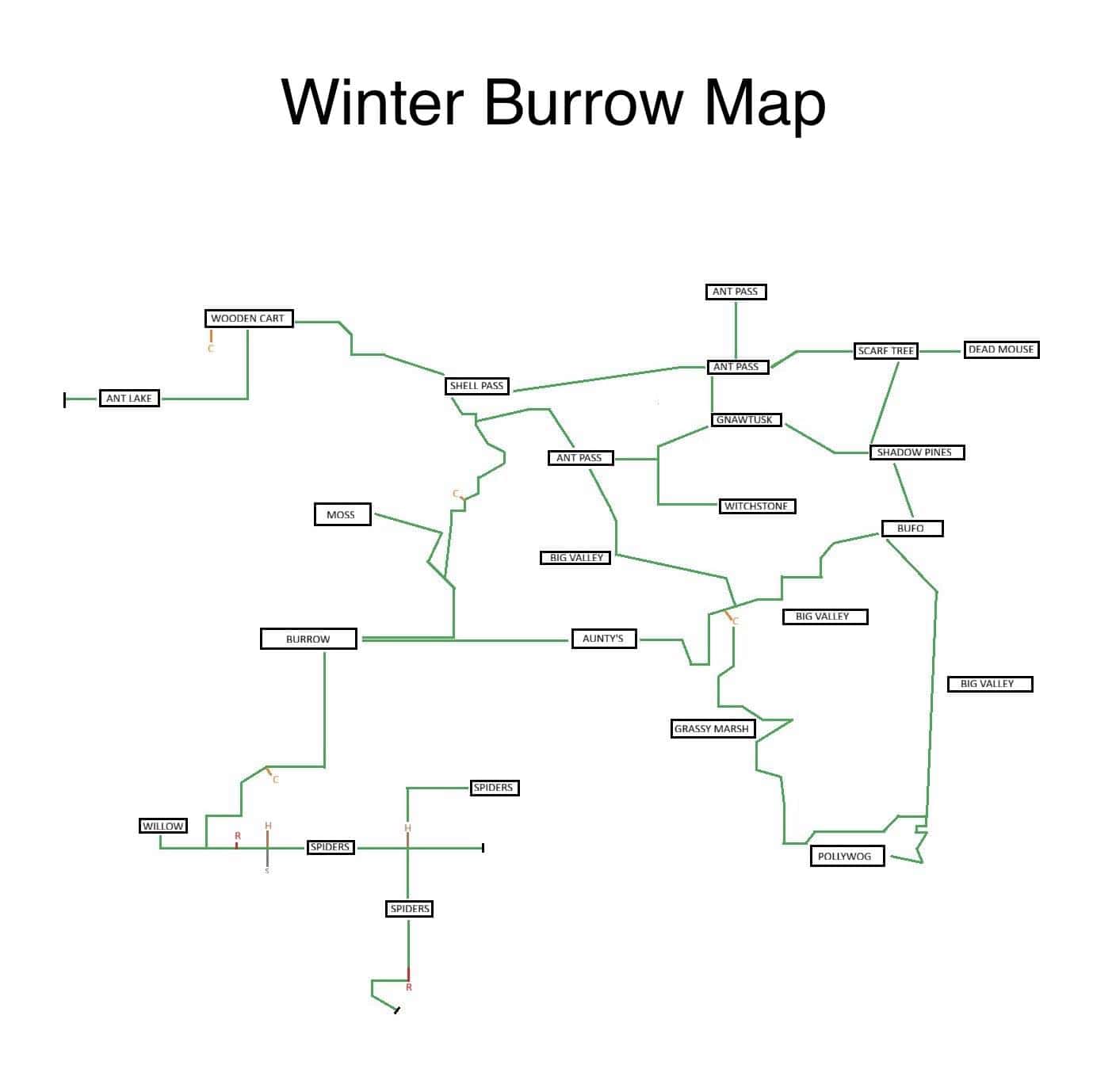
Static community reference map (credit: winterburrow.site community). Use it with the updated in-game map and the route index below. Open full‑size for details.
01
Guide Step
Quick Answer: is there a Winter Burrow map?
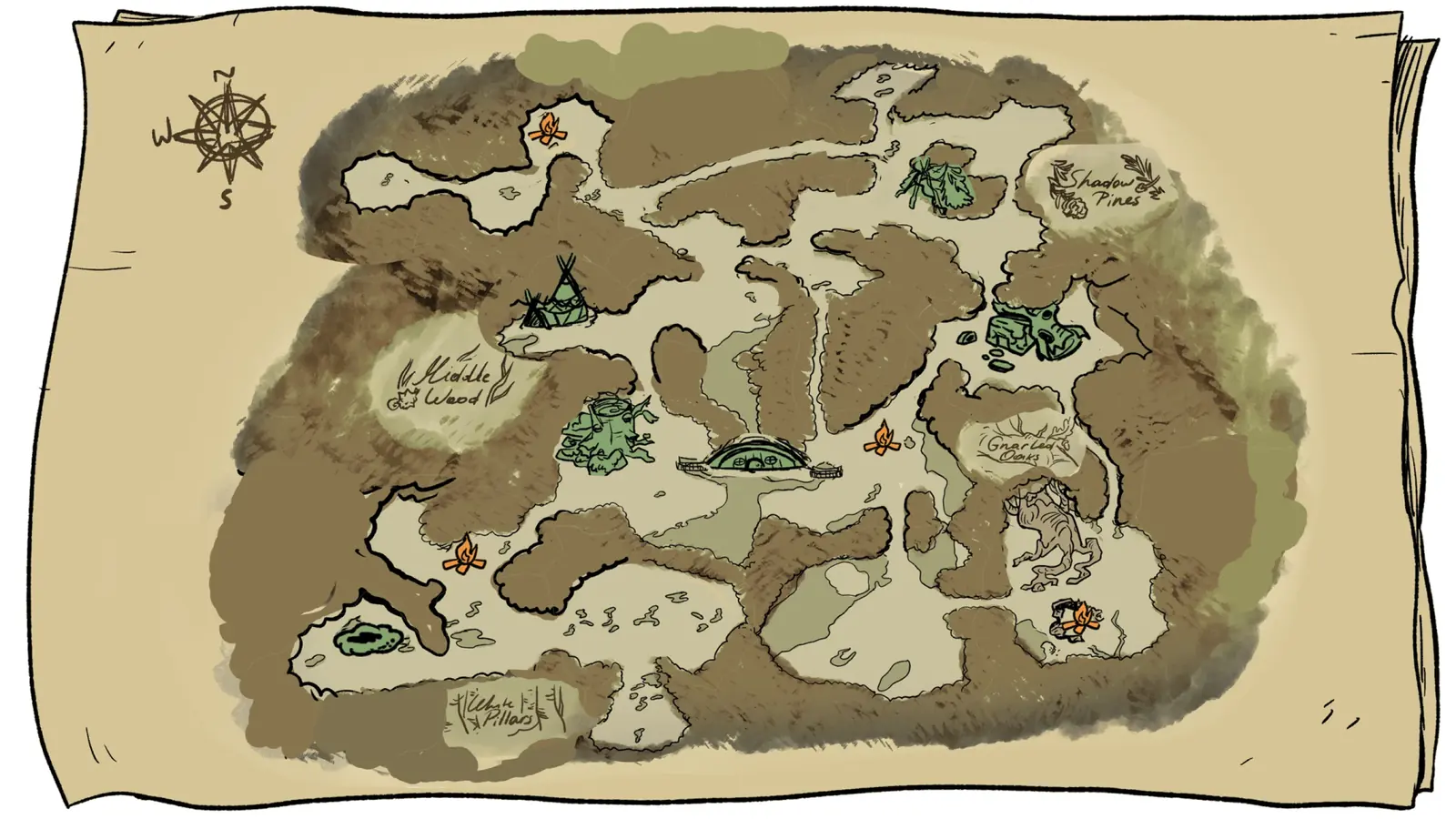
Yes. There is an in-game Winter Burrow map, and it arrived in the free Winter Solstice update on 17 December 2025. Pine Creek Games announced it directly: a new map feature to help you navigate the Northlands more easily. If you are reading a guide that still says the game ships without one, that guide predates the update and has not been corrected since. Open it from the HUD and you get a hand-drawn sheet of the Northlands with a compass rose in the top-left, your burrow sitting near the middle, named regions written across the sheet, and a small campfire icon everywhere you have already lit one.
The developer set expectations for it a month before it shipped, and that wording explains most of the complaints about it. In a 21 November 2025 post, Pine Creek Games said the map would fill the entire screen, let you view every area you have unlocked, and show which area you are currently in - but that it would deliberately not tell you precisely where you are, because they wanted to keep the feeling of exploration and surprise. Their own summary of the goal was modest: it should help you find your way home. So it is a world-level map of regions, not a local map of the screen you are standing on. If you opened it looking for a player marker, that absence is a deliberate design decision, not a bug you can patch out.
Here is the part that trips people up. The Winter Burrow map tells you where a place is. It does not tell you why you cannot get into it. It will cheerfully draw a region you have no route to, because the thing standing between you and that region is a Granite Pickaxe you have not crafted, a Flint Shovel you have not made, or a quest flag that has not flipped yet. Most of the time you are not lost at all - you are gated, and a second map image will not fix a gate.
So use three things together and stop after whichever one answers you: the in-game map for direction, the region and NPC lists further down for names, and the route index when something on screen refuses to break, open, or dig.
Direction problem: open the in-game map, find your burrow, and walk toward the named region you want.
Naming problem: use the labelled community charts below when you need to know which blob is Bufo, Moss, Willow or Pollywog.
Gate problem: if a rock will not break or a tunnel has no prompt, that is a tool or quest issue, not a map issue.
02
Guide Step
What the in-game Winter Burrow map actually shows
The in-game sheet is deliberately vague, and that is a design choice rather than a bug. It is drawn like something your character sketched by hand: soft brown shading for the forest that hems you in, pale open ground for the areas you can actually walk, and ink outlines around the parts of the world that connect. There are no coordinates, no grid, no player arrow that spins as you turn, and no quest markers.
What you do get is genuinely useful once you know to look for it. Your burrow is the green mound with the little fence around it, roughly in the centre of the sheet. Campfires you have lit show up as small orange flame icons, and they are the single most useful thing on the whole sheet, because they double as a memory of where you have already been and a safe point to run back to when the weather turns. There is a tent in the north-west, patches of green where foliage clusters, and a large skeletal shape drawn near the eastern woods that marks the Gnarled Oaks area.
Read it as a rough shape of the world, not as a survey. If the coastline on the sheet does not perfectly match the screen you are standing on, the sheet is not wrong - it was never meant to be precise.
Your burrow: green mound with a fence, near the centre of the map sheet.
Campfires: orange flame icons, only appearing after you light them. Treat them as your real waypoints.
Forest shading: brown means blocked scenery, pale means walkable ground.
No markers: there are no quest pins, no coordinates, and no live player arrow. Landmarks do that job instead.
The in-game Winter Burrow map: compass rose top-left, your burrow centre, campfires as orange icons, and the four written region names - Middle Wood, Shadow Pines, Gnarled Oaks and White Pillars.
03
Guide Step
Every named region written on the map
Only four names are actually printed on the in-game map, which is why so many players end up hunting for a labelled version. Those four are Middle Wood on the west side, Shadow Pines in the north-east, Gnarled Oaks on the east below Shadow Pines, and White Pillars along the southern edge. Everything else is unnamed shape.
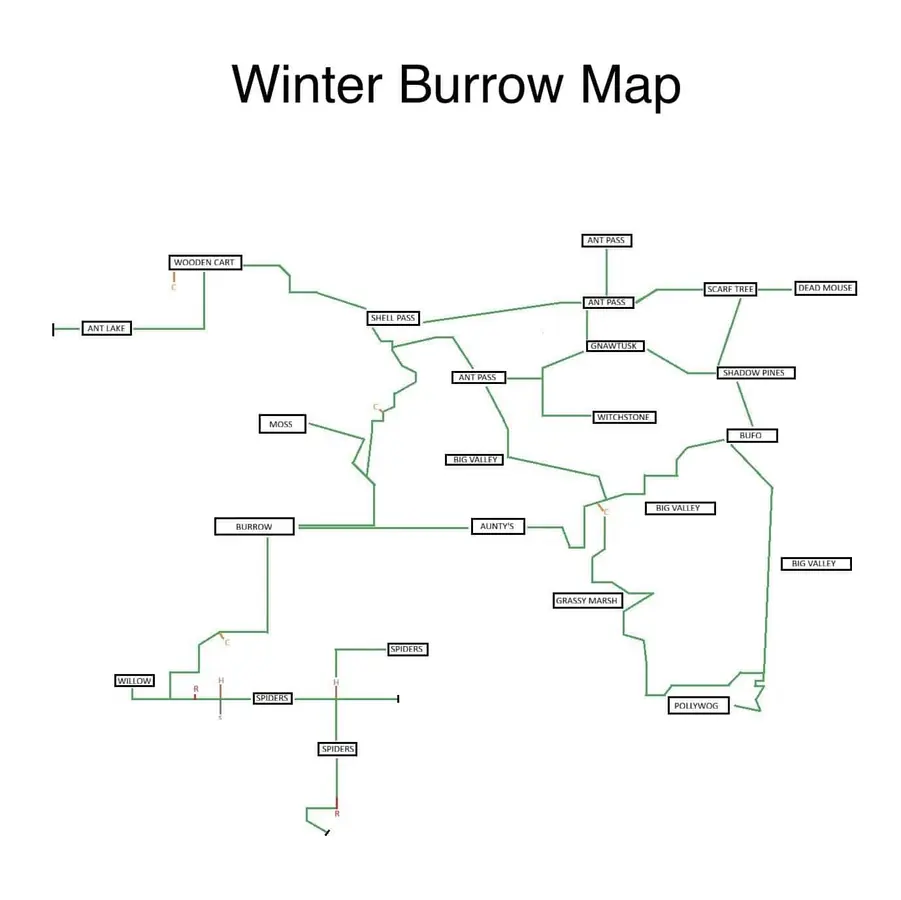
Community charts fill that gap by naming the screens rather than the regions, and that is the format worth learning, because Winter Burrow is built out of connected screens rather than one seamless field. The chart below lays out the whole world as boxes joined by lines, which matches how you actually move: you leave one screen by a specific edge and arrive on the next. Ant Pass appears three separate times, Big Valley appears three times, and Spiders appears three times - those are genuinely different screens that share a name, so do not assume a repeated label means you have gone in a circle.
Printed on the in-game map: Middle Wood (west), Shadow Pines (north-east), Gnarled Oaks (east), White Pillars (south).
Northern route screens: Wooden Cart, Ant Lake, Shell Pass, Ant Pass, Scarf Tree, Dead Mouse.
Eastern route screens: Gnawtusk, Witchstone, Shadow Pines, Bufo, Big Valley.
Central and southern screens: Burrow, Aunty’s, Grassy Marsh, Moss, Willow, Pollywog, Spiders.
Repeated names such as Ant Pass, Big Valley and Spiders are separate screens, not the same room revisited.
A connection chart of the world. Each box is one screen and each line is a walkable edge, which is closer to how movement actually works than a painted world map.
04
Guide Step
Winter Burrow map: where every character lives
The in-game sheet names zero NPCs, and that is the single biggest gap in the in-game map. Using the connection chart above, here is where the people you actually need sit relative to your burrow.
Aunty’s place is due east of the burrow along a single straight run - it is the closest named destination you have and the one the early quests keep sending you back to. Moss sits north of the burrow, up the winding central path. Willow is south-west, down and around past a campfire. Bufo is far to the north-east, past Shadow Pines. Pollywog is the deep south-east corner, and it is a long walk: from Bufo you head south down the eastern edge, past Big Valley, and keep going. Gnawtusk is north-east of centre, sandwiched between Ant Pass and Shadow Pines, near the Witchstone and Scarf Tree screens.
Distance matters more than direction here. The Pollywog and Bufo runs are the two that most often end with a player freezing in the dark, because they are the longest unbroken stretches in the game. Light the campfires along the way the first time you make either trip and both routes stop being dangerous.
Aunty: straight east of the burrow, shortest named route on the map.
Moss: north of the burrow up the central path.
Willow: south-west of the burrow, past a campfire.
Bufo: far north-east, beyond Shadow Pines.
Pollywog: deep south-east, the longest run on the map. Start it in daylight.
Gnawtusk: north-east of centre, near Witchstone and Scarf Tree.
05
Guide Step
Reading routes as landmarks, not coordinates
Because the Winter Burrow map has no grid, the players who navigate well are the ones who memorise the world as short landmark chains instead of trying to hold a picture in their head. The visual language is consistent enough to rely on: a waterline is the best direction reset in the game, tall grass hides exits along its far edge, hollow logs almost always mean a real transition to another screen rather than decoration, and stone versus granite tells you which tool tier a gate wants.
Write your routes as sentences. "Bufo, shoreline south, stone gate, grass band, broken logs, campfire" is something you can repeat out loud on the walk back. A screenshot is not, because the moment you are two screens deep you are comparing a painted blob to a tree line and guessing.
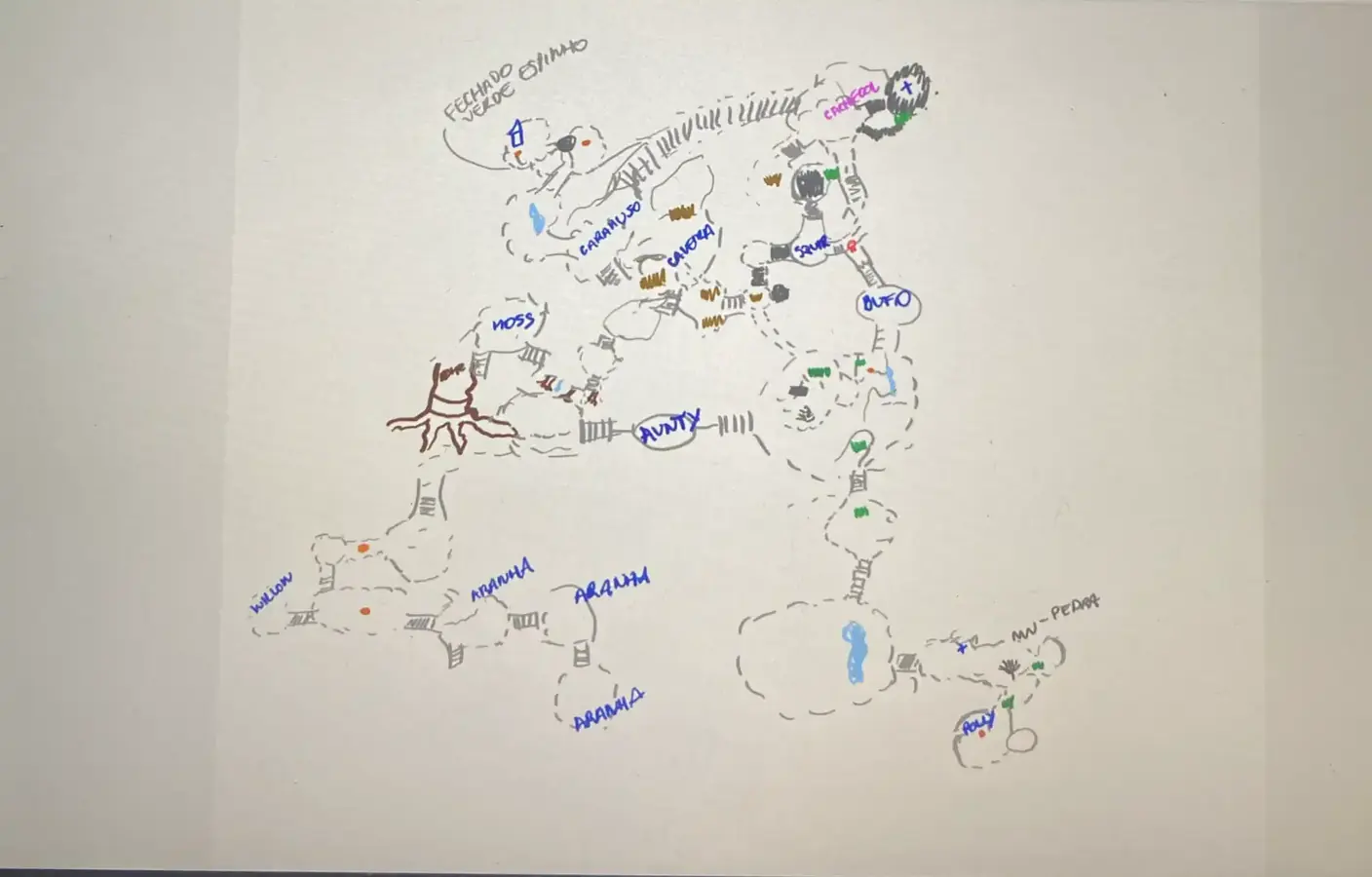
The hand-drawn player map below is a good example of how this works in practice. It is messy, it is not to scale, and it is annotated in another language - and it is still more useful than the official sheet for route planning, because it marks the connections and the dangers rather than the shapes.
Water edge: follow it to reset your bearings or get back to a known NPC screen.
Tall grass: check the far edge for a darker gap before deciding the path is closed.
Hollow logs and tunnels: these are real transitions, not scenery.
Stone versus granite: if a node will not break, your tool tier is early. The map is not lying to you.
Campfires: light the one nearest a fork before pushing deeper. It becomes your return anchor on the map.
A hand-annotated player map. Route-planning value comes from the marked connections, spider screens and campfire dots, not from accurate proportions.
06
Guide Step
Route index: when the map is right but you still cannot get through
This is the section to use when you know exactly where you want to go and something on screen is refusing you. Pick the line that matches the object in front of you or the text on your HUD, rather than opening another map and hoping a different picture helps.
When the Winter Burrow map looks stuck, blank or wrong
Three different problems get reported as a broken Winter Burrow map, and they have three different fixes.
The first is a map that opens but does not match what you see. Almost always this means you are comparing the in-game sheet to a fan image drawn at a different scale, or reading a route that assumed a different starting NPC. Trust the sheet for direction and the landmarks for the final approach.
The second is a map that shows a region you cannot reach. That is not a map fault at all - it is a tool gate, a quest state, or a tunnel that has not been inspected yet. Go back to the route index above.
The third is a map that genuinely will not update, usually reported after a feature patch. Reload the save, sleep one night, and re-enter the region so it registers as discovered. If a screen still refuses to appear on the map after that, treat it as undiscovered rather than broken and walk the edge of the region once more.
A quick self-test that saves a lot of wasted walking: can you name your start point, your target, and the thing blocking you? "Moss, Heavy Key, vines" is a route problem. "Willow, tunnel, no dig prompt" is a quest-state or bug problem. "Bufo, granite, rock will not break" is a tool problem. "The map is open and I do not know which blob I am standing on" is the only one that is actually a map problem.
Map does not match a fan image: trust the in-game sheet, then verify with landmarks.
Map shows a region you cannot enter: this is a gate. Use the route index, not another map.
Map will not update after a patch: reload, sleep once, re-enter the region.
You cannot tell where you are: walk to a waterline or a lit campfire and re-open the map there.
08
Guide Step
Map update, stuck, glitch, or bug: a state-first check
If you searched for a Winter Burrow map update, map stuck fix, or map glitch, classify the symptom before changing the route. A blank or unchanged sheet can be an undiscovered screen, an inactive quest, a tunnel that has not been inspected, or a tool gate that the map cannot explain. The low-risk check is to reload the save, sleep once, re-enter the region, and compare the HUD objective with the route index. No universal map-bug fix is confirmed, and a Reddit, mod, or emulator clip is not proof of the current PC, Switch, Xbox, or mobile build.
Pinesap, Pollywog, Heavy Key, and Mole Artifact are quest-state routes, not map pins.
Granite and Flint look different and require different Pickaxe tiers; confirm the tool before repeating a trip.
Willow's home-side tunnel and the mole-tunnel fast-travel network are separate route families.
Record platform, current objective, visible prompt, and patch before reporting a reproducible bug.
09
Guide Step
Is there an interactive Winter Burrow map?
Not a complete one, and it is worth being straight about that rather than sending you round in circles. Several sites host a map page, and a few describe themselves as interactive, but none currently offers a verified pin-by-pin tool that also tracks prerequisites - which is the part that would actually help. A clickable pin that says "Granite here" is not much use if it does not also tell you that you need the Granite Pickaxe first.
What exists in practice: the in-game sheet, static community images like the ones on this page, Reddit threads where players post their own annotated maps, and route guides with screenshots. That combination covers real questions better than any single interactive map currently does. If that changes, this page gets updated.
One caution about Reddit map threads specifically. They are often excellent, but the screenshots can come from a different patch or a different quest stage, and there is rarely a note saying which. Cross-check anything surprising against the in-game map before you commit a night to walking there.
No public interactive map currently includes tool gates and quest prerequisites.
Static community images are still the fastest way to get named NPC locations.
Reddit map threads are useful but may predate the current patch.
Route guides with screenshots remain the only reliable way to clear a specific blocker.
10
Guide Step
Two practice loops before you commit to a long route
If the world still feels shapeless, run these two short loops in daylight before attempting Pollywog or Pinesap. The goal is not progress. It is learning how the map, the landmarks and your return path line up, so that the long runs later stop being gambles.
Bufo loop: walk to Bufo, hold the shoreline as your compass, cross exactly one blocker, and turn back before dusk.
Moss loop: start at Moss, reach the skull landmark, take the left exit, clear the vine gates, and stop at the caravan fire.
Granite check: visit one granite blocker purely to confirm your tool tier, then go home. If it fails, you are early, not lost.
11
Guide Step
Frequently asked questions
Short answers to the things people actually ask before opening another map tab.
Is there a map in Winter Burrow? Yes - an in-game Winter Burrow map was added after launch. Older guides saying otherwise are out of date.
Does the Winter Burrow map show NPC locations? No. It names only four regions. Use the connection chart on this page for Aunty, Moss, Willow, Bufo, Pollywog and Gnawtusk.
What are the four named regions? Middle Wood, Shadow Pines, Gnarled Oaks and White Pillars.
Is there a complete interactive Winter Burrow map? Not one that tracks tool gates and quest prerequisites, which is the part that matters.
Why can I see a place on the map but not reach it? You are gated by a tool, a key, a tunnel state or an inactive quest. Use the route index above.
My Winter Burrow map will not update - is it a bug? Usually not. Reload, sleep once, and re-enter the region so it registers as discovered.
Supply Tip 1
Use the updated in-game map for orientation, then route pages for blockers.
Supply Tip 2
If the marked region is visible but unreachable, check the tool, key, tunnel, or quest prerequisite before walking again.
Supply Tip 3
Run new routes by day first; add tea/campfire if the planner shows Danger.
Yes, the map situation changed after launch. Use the updated in-game map for direction, then use community maps and route guides for labels, resources, and blockers.
What is the best current map?
The best setup is layered: in-game map for orientation, static community maps for labels, and WinterBurrow.org route pages for Pickaxe, Flint, Pollywog, Pinesap, Granite, Heavy Key, tunnels, and Mole Artifact.
Is there a real interactive map?
No public map currently verifies every pin, tool gate, and quest prerequisite. Use the in-game map for region orientation, then open the route page that matches the object or objective blocking you.
Where should I go for Pollywog or Pinesap?
Use this map hub for the region, then open the dedicated Pollywog or Pinesap guide after the matching NPC objective is active.
Why can I see the route but still be blocked?
Most failures are progression checks, not map errors. Check the required tool, NPC quest state, key, or tunnel unlock before spending more warmth on the same path.
Why is my map blank or stuck after an update?
Reload the save, sleep once, re-enter the region, and compare the active HUD objective with the route index. The screen may be undiscovered or gated by a quest, tunnel, or tool; no universal map-bug fix is confirmed.
Does the map show Pinesap, Pollywog, or the Mole Artifact?
No exact quest pins are confirmed. Use the map for orientation, then open the dedicated guide after the relevant objective is active.